Can you spot when you're being phished? Take this quiz from Google and Jigsaw.
Here is an example of a malicious email message, and eight points that show you this is fake:
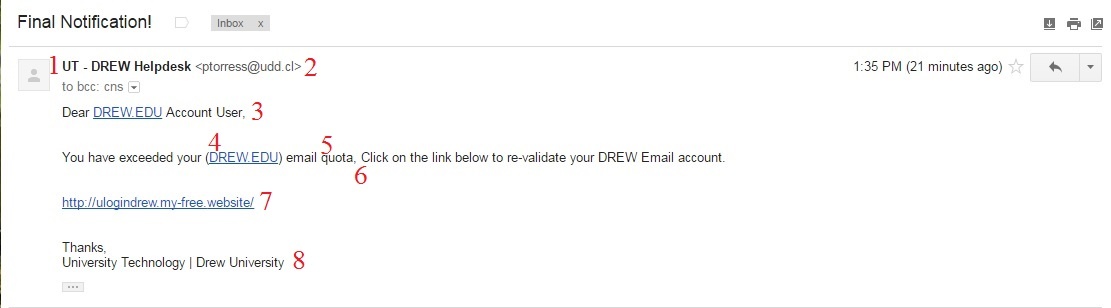
If you are ever suspicious of an email, it is better that you NOT click on any links or follow any instructions in the email. Contact the person or department the email is reportedly from via a different means, such as by phone. If you are concerned about the security of your password, navigate to the page in question yourself - not by following any links in the email - and change your password.
Although making the time to check details can seem impossible, try to take a minute to notice a few things.
Viewing a file that is shared with you should not prompt you to approve additional access. Always pay close attention to WHO is asking for WHAT access, and consider carefully whether they need it or not (this is true of the apps you install on your phone, as well!).
Do not download an attachment you are not expecting.
If you receive a surprise email invitation from someone you know (well, or maybe someone you haven't spoken to in ages), take a beat before clicking any links.
A new phishing technique is using compromised (or spoofed) email accounts to send what appear to be invitations from places like Punchbowl, Paperless Post, or Evite.
The New York Times published an article about this on April 23, 2026. You can read it here (after you hover over the link to make sure you know where it is pointing you!).
If you've held on to a real invitation from one of these places, you can compare the layout and the sender address. As with the example above, that sender address is significant.
If you receive one of these phishing attempts, please flag the item as phishing so that your email service provider can learn to recognize it.
As long as you have not clicked on any links or downloaded any attachments within a suspicious email, you can report it as spam or phishing and safely delete the message.
Why report it? Because Google can use the data to better protect everyone. Enough reports received against a particular sender will prompt Google to block that sender.
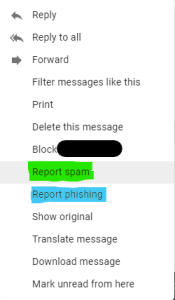
Spam is categorized as uninvited advertising - a message sent to large groups of people trying to convince them to buy a product or service.
Phishing is more targeted and more malicious. It is an attempt to garner personal information - often usernames and passwords - that can be sold and/or used to gain access to other information, systems, and/or money.
Visit this page at the Federal Trade Commission website, https://consumer.ftc.gov/articles/how-recognize-and-report-spam-text-messages, for information about recognizing and reporting spam text messages.
Reviewed 4/29/26